
Subaru Outback (BR): Cargo area light (Outback) bulb replacing
Subaru Outback (BR) 2010-2015 Owners Manual / Maintenance and service / Replacing bulbs / Cargo area light (Outback) bulb replacing
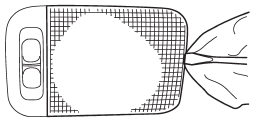
1. Remove the lens by prying the edge of the lens with a flat-head screwdriver.
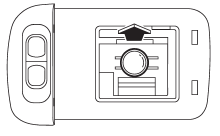
2. Pull the bulb out of the socket.
3. Install a new bulb.
4. Reinstall the lens.
READ NEXT:
 Other bulbs
Other bulbs may be difficult to replace. We recommend that you have the bulbs
replaced by your SUBARU dealer if necessary.
SEE MORE:
Fuel economy hints
The following suggestions will help to save your fuel.
● Select the proper gear position for the speed and road conditions.
● Avoid sudden acceleration or deceleration. Always accelerate gently until you
reach the desired speed. Then try to maintain that speed for as long as possible
Front Wiper Motor and Link
A: REMOVAL
1) Disconnect the ground cable from battery.
2) Remove the front wiper arm assembly.
CAUTION:
Follow the steps below when standing up the wiper arm. Not following the steps
may cause contacting
of wiper arms and damages of wiper arms.
1. Stand up the driver's side wiper arm.
2. Stand u
© 2010-2026 Copyright www.suoutback.com
