
Subaru Outback (BR): Multi function display
Subaru Outback (BR) 2010-2015 Owners Manual / Instruments and controls / Multi function display
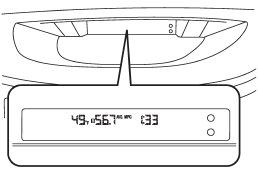
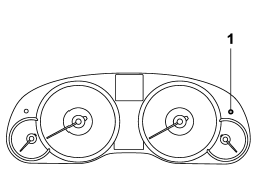
1) Multi function display switching knob
With the ignition switch in the “ON” position, each successive press of the multi function display switching knob toggles the display in the following sequence.
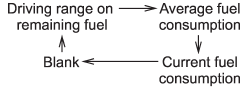
- Outside temperature indicator
- Average fuel consumption
- Current fuel consumption
- Driving range on remaining fuel
READ NEXT:
 Outside temperature indicator
1) U.S.-spec. models
2) Except U.S.-spec. models
The outside temperature indicator shows the outside temperature in a range from
−22 to 1228F (−30 to 508C).
The indicator can give a
Road surface freeze warning indication
1) U.S.-spec. models
2) Except U.S.-spec. models
When the outside temperature drops to 378F (38C) or lower, the temperature indication
flashes to show that the road surface may be frozen.
If th
Average fuel consumption
1) U.S.-spec. models
2) Except U.S.-spec. models
This indication shows the average rate of fuel consumption since the trip meter
was last reset.
Pressing the trip knob toggles the indication be
SEE MORE:
Clutch Fluid
A: INSPECTION
1) Park the vehicle on a level surface.
2) Check the clutch fluid level using the scale on
the outside of the reservoir tank. If the clutch fluid
level is below "MIN", fill the clutch fluid up to "MAX"
level, and make sure that there is no leakage.
MAX. level
MIN. level
Reservoir
Checking the brake fluid level
CAUTION
Prevent brake fluid from coming into contact with your eyes, as it can cause harm. In case of eye contact, immediately rinse them thoroughly with clean water. It's recommended to wear eye protection when working with brake fluid for safety reasons.
Brake fluid has the ability to absorb moi
© 2010-2026 Copyright www.suoutback.com
