
Subaru Outback (BR): To install the cover housing
Subaru Outback (BR) 2010-2015 Owners Manual / Interior equipment / Cargo area cover (if equipped) / To install the cover housing
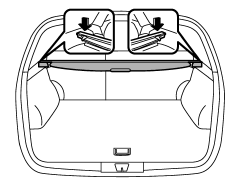
1. To install the cover housing, insert both ends of the cover housing into the retainers.
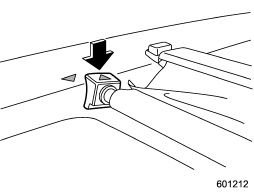
2. Make sure to fix the front part of the cargo area cover behind the rear seat.
READ NEXT:
 Convenient tie-down hooks (if equipped)
CAUTION
The convenient tie-down hooks are designed only for securing light cargo. Never
try to secure cargo that exceeds the capacity of the hooks. The maximum load capacity
is 44 lbs (20 kg) per
Under-floor storage compartment
The subfloor storage compartment is located under the floor of the trunk or cargo
area and can be used to store small items. To open the lid, pull the tab or handle
up.
NOTE
When storing a flat
Rear view camera (if equipped)
Legacy
Outback
A rear view camera is attached to the trunk lid (Legacy) or rear gate (Outback).
When the ignition switch is “ON” and the shift lever (MT models) or select lever
(AT or CV
SEE MORE:
Double trip meter
1) Trip knob
This meter displays the two trip meters when the ignition switch is in the “ON”
position.
The trip meter shows the distance that the vehicle has been driven since you
last set it to zero.
If you press the trip knob when the ignition switch is in the “LOCK” or “Acc”
CVTF
A: INSPECTION
Check for leakage of CVTF from transmission.
B: ADJUSTMENT
CAUTION:
CVTF level changes along with CVTF temperature. When inspecting CVTF
level, observe the specified
CVTF temperature.
Always use specified CVTF or equivalent. Using other fluid than
specified or equivalent will c
© 2010-2026 Copyright www.suoutback.com
