
Subaru Outback (BR): Channel selection by pressing the button
Subaru Outback (BR) 2010-2015 Owners Manual / Audio / Satellite radio operation (if equipped) / Channel and category selection / Channel selection by pressing the button
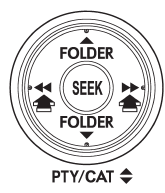
When in the SAT mode, briefly press the “SEEK” button “ ”
or “ ” to select the channel.
READ NEXT:
 Skip channel selection
When in the SAT mode, press the “SEEK” button “”
or “” continuously to change to the
channel selection mode. Pressing the “SEEK” button “”
changes the channel up by 10 step
Category selection
To activate the category search mode, press the “PTY/CAT” button. To deactivate
the category search mode, press the “PTY/CAT” button again.
When in the category search mode, pressing th
Channel scan
If you press the “SCAN” button while the radio is in the category search mode,
the radio turns to the category SCAN mode. In the category SCAN mode, the radio
scans only channels in the sele
SEE MORE:
Dome light remove bulb
1. Remove the lens by prying the edge of the lens with a flat-head screwdriver.
2. Turn the bulb until the flat surfaces at its ends are aligned vertically.
3. Pull the bulb straight downward to remove it.
4. Install a new bulb.
5. Reinstall the lens.
Remote transmitter program
New transmitters can be programmed to the remote engine start system in the event
that a transmitter is lost, stolen, damaged or additional transmitters are desired
(the system will accept up to eight transmitters). New remote engine start transmitters
can be programmed according to the follow
© 2010-2026 Copyright www.suoutback.com
