
Subaru Outback (BR): Audio control buttons (if equipped)
Subaru Outback (BR) 2010-2015 Owners Manual / Audio / Audio control buttons (if equipped)
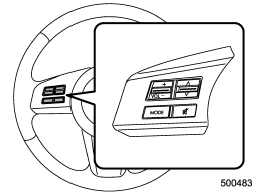
Type A audio
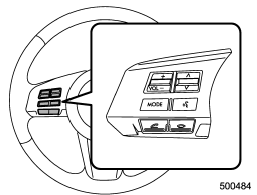
Type B audio
These buttons are located on the spokes of the steering wheel. They allow the driver to control audio functions without taking his/her hands off the steering wheel.
READ NEXT:
 MODE button
This button is used to select the desired audio mode. Each time it is pressed,
the mode changes to the next one in the following sequence.
*1: The frequency last received in the selected waveba
“up” and “down” switch
With radio mode selected
Press the switch to the “” or “”
side briefly to skip to a preset channel. Press the switch to the “”
or “” side for more than 0.5 second
to seek the
Volume control switch
Press the switch to the “+” side to increase the volume. Press the switch to
the “−” side to reduce the volume. A number indicating the volume will be shown
on the audio display.
SEE MORE:
Replacing the battery
CAUTION
● Do not let dust, oil or water get on or in the transmitter when replacing the
battery.
● Be careful not to damage the printed circuit board in the transmitter when replacing
the battery.
● Be careful not to allow children to touch the battery and any removed parts;
Electronic Brake Force Distribution (EBD) system warning
The brake system warning light also illuminates if a malfunction
occurs in the EBD system. In that event, it illuminates together with the ABS warning
light. The EBD system may be malfunctioning if the brake system warning light and
ABS warning light illuminate simultaneously during driving.
© 2010-2026 Copyright www.suoutback.com
