
Subaru Outback (BR): To increase the speed (by the “RES/ SET” switch)
Subaru Outback (BR) 2010-2015 Owners Manual / Starting and operating / Cruise control / To change the cruising speed / To increase the speed (by the “RES/ SET” switch)
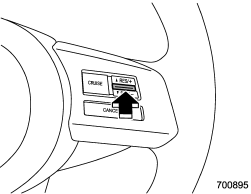
Press the “RES/SET” switch to the “RES” side and hold it until the vehicle reaches the desired speed. Then, release the switch. The vehicle speed at that moment will be memorized and treated as the new set speed.
U.S.-spec. models
When the difference between the actual vehicle speed and the set speed is less than 4 mph (6.8 km/h), the set speed can be increased 1 mph (1.6 km/h) each time by pressing the “RES/SET” switch to the “RES” side quickly.
Canada-spec. models
When the difference between the actual vehicle speed and the set speed is less than 4.4 km/h, the set speed can be increased 1 km/h each time by pressing the “RES/SET” switch to the “RES” side quickly.
READ NEXT:
 To increase the speed (by accelerator pedal)
1. Depress the accelerator pedal to accelerate the vehicle to the desired speed.
2. Press the “RES/SET” switch to the “SET” side once. Now the desired speed is
set and the vehicle will keep
To decrease the speed (by the “RES/SET” switch)
Press the “RES/SET” switch to the “SET” side and hold it until the vehicle reaches
the desired speed. Then, release the switch. The vehicle speed at that moment will
be memorized and tre
To decrease the speed (by brake pedal)
1. Depress the brake pedal to release cruise control temporarily.
2. When the speed decreases to the desired speed, press the “RES/SET” switch
to the “SET” side once. Now the desired speed
SEE MORE:
Using your Owner’s Manual
Before you operate your vehicle, carefully read this manual. To protect yourself
and extend the service life of your vehicle, follow the instructions in this manual.
Failure to observe these instructions may result in serious injury and damage to
your vehicle.
This manual is composed of fourt
Frontal airbag system operation
1) Driver’s side
2) Passenger’s side
The SRS airbag can function only when the ignition switch is in the “ON” position. The SUBARU advanced frontal airbag system is designed to determine the activation or deactivation condition of the front passenger’s SRS
© 2010-2026 Copyright www.suoutback.com
