
Subaru Outback (BR): Examples of the types of accidents in which the SRS side airbag and SRS curtain airbag will basically not deploy.
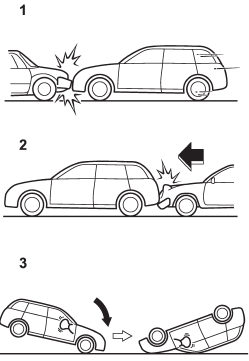
1) The vehicle is involved in frontal collision with another vehicle (moving or stationary).
2) The vehicle is struck from behind.
3) The vehicle pitches end over end.
In the event of accidents like those illustrated, the SRS side airbag and SRS curtain airbag are basically not designed to deploy.
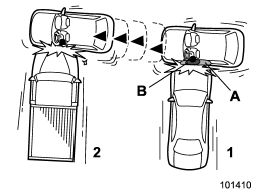
1) First impact
2) Second impact
A) SRS curtain airbag
B) SRS side airbag
In an accident where the vehicle is struck from the side more than once, the SRS side airbag and SRS curtain airbag deploy only once on the first impact.
Example: In the case of a double side impact collision, first with one vehicle and immediately followed by another from the same direction, once the SRS side airbag and SRS curtain airbag are activated on the first impact, they will not be activated on the second.
READ NEXT:
 SRS airbag system monitors
A diagnostic system continually monitors the readiness of the SRS airbag system
(including front seatbelt pretensioners) while the vehicle is being driven. The
SRS airbag system warning light wi
SRS airbag system servicing
WARNING
● When discarding an airbag module or scrapping the entire vehicle damaged by
a collision, consult your SUBARU dealer.
● The SRS airbag has no userserviceable parts. Do not use
Precautions against vehicle modification
WARNING
To avoid accidental activation of the system or rendering the system inoperative,
which may result in serious injury, no modifications should be made to any components
or wiring of the SR
SEE MORE:
Channel scan
If you press the “SCAN” button while the radio is in the category search mode,
the radio turns to the category SCAN mode. In the category SCAN mode, the radio
scans only channels in the selected category. If you press the “SCAN” button while
the radio is not in the category search mo
How to preset stations
1. Press the “FM” or “AM” button to select FM1, FM2, FM3 or AM reception. 2.
Press the “” or “”
side of the “SEEK” button or tune the radio manually until the desired station frequency
is displayed. 3. Press one of the preset buttons for more than 1.5 seconds to store
the
