
Subaru Outback (BR): Feature of distance marker
Subaru Outback (BR) 2010-2015 Owners Manual / Interior equipment / Rear view camera (if equipped) / Help line / Feature of distance marker
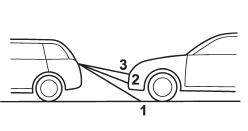
1) 3 feet (1 m) line
2) 6.5 feet (2 m) line
3) 10 feet (3 m) line
The distance marker shows the distance on the road. If there is a car or other object close behind, distance cannot be correctly displayed.
READ NEXT:
SEE MORE:
 Selection of manual mode
With the vehicle either moving or stationary, move the select lever from the
“D” position to the “M” position to select the manual mode.
1) Upshift indicator
2) Downshift indicator
3) Gear position indicator
When the manual mode is selected, the gear position indicator and upshift
To decrease the speed (by the “RES/SET” switch)
Press the “RES/SET” switch to the “SET” side and hold it until the vehicle reaches
the desired speed. Then, release the switch. The vehicle speed at that moment will
be memorized and treated as the new set speed.
U.S.-spec. models
When the difference between the actual vehicle speed
© 2010-2026 Copyright www.suoutback.com
