
Subaru Outback (BR): Glove box
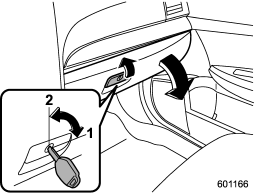
1) Lock
2) Unlock
To open the glove box, pull the handle. To close it, push the lid firmly upward.
To lock the glove box, insert the key and turn it clockwise. To unlock the glove box, insert the key and turn it counterclockwise.
READ NEXT:
 Center console box (front)
If you remove the divider plate from the dual cup holders, you can use the center
console box as a storage space.
To use as storage space:
Pull out the divider plate of the dual cup holder.
T
Center console box (rear)
The center console box has a two-layer structure consisting of an upper compartment
and a lower compartment.
Upper compartment
1) Upper compartment lock release Pull up the upper compartment l
SEE MORE:
Cruise Control System
General Description
A: COMPONENT
Engine control module (ECM)
Cruise control command switch
Stop light and brake switch
Cruise indicator light and cruise
set indicator light
Transmission control module
(TCM) (AT and CVT model)
Inhibitor switch (CVT model)
Neutral position switch (MT
model
Programming the transmitters
The remote keyless entry system is equipped with a special code learning feature
that allows you to program new transmitter codes into the system or to delete old
ones. The system can learn up to four unique transmitter codes. The four transmitter
codes may be the same or different.
Programmi
© 2010-2026 Copyright www.suoutback.com
