
Subaru Outback (BR): Power door locking switches
Subaru Outback (BR) 2010-2015 Owners Manual / Keys and doors / Power door locking switches
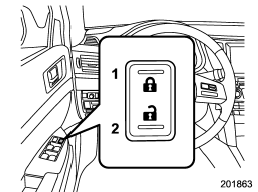
1) Lock
2) Unlock
All doors and the rear gate (Outback) can be locked and unlocked by the power door locking switches located at the driver’s side and the front passenger’s side doors. To lock the doors, press the front side of the switch.
To unlock the doors, press the rear side of the switch.
When you close the doors after you set the door locks, the doors remain locked.
NOTE
Make sure that you do not leave the key inside the vehicle before locking the doors from the outside using the power door locking switches.
READ NEXT:
 Key lock-in prevention function
This function prevents the doors from being locked with the key still in the
ignition switch.
Behavior with key lock-in prevention function operational
With the driver’s door open, the doors are automatically kept unlocked even if
the front side of the power door locking switch is pressed.
Behavior with key lock-in prevention function non-operational
● If the lock lever is turned to the rear (“LOCK”) position with the driver’s
door open and the driver’s door is then closed with the lock lever in that position,
the driver’s door
SEE MORE:
Locking the doors
Press the “” button to lock all doors
and rear gate (Outback). An electronic chirp will sound once and the turn signal
lights will flash once.
If any of the doors (or the rear gate/trunk lid) is not fully closed, an electronic
chirp will sound five times and the turn signal lights will
Headlight flasher
CAUTION
Do not hold the lever in the flashing position for more than just a few seconds.
To flash the headlights, pull the lever toward you and then release it. The high
beam will stay on for as long as you hold the lever. The headlight flasher works
even though the lighting switch is in the
© 2010-2026 Copyright www.suoutback.com
