
Subaru Outback (BR): Transmission select lever
Subaru Outback (BR) 2010-2015 Owners Manual / Starting and operating / Automatic transmission/Continuously variable transmission / Transmission select lever
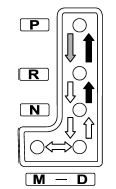
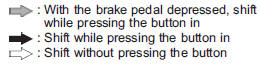
The select lever has four positions, “P”, “R”, “N”, “D” and also has a manual gate for using the manual mode.
READ NEXT:
 P (Park)
This position is for parking the vehicle and starting the engine.
In this position, the transmission is mechanically locked to prevent the vehicle
from rolling freely.
When you park the vehicle, f
R (Reverse)
This position is for backing the vehicle. To shift from the “N” to “R” position,
stop the vehicle completely then move the lever to the “R” position.
N (Neutral)
This position is for restarting a stalled engine.
In this position the wheels and transmission are not locked. In this position,
the transmission is neutral; the vehicle will roll freely, even on t
SEE MORE:
Tire inspection
Check on a daily basis that the tires are free from serious damage, nails, and
stones. At the same time, check the tires for abnormal wear.
Contact your SUBARU dealer immediately if you find any problem.
NOTE
● When the wheels and tires strike curbs or are subjected to harsh treatment
a
Floor mat
Retaining pins are located on the driver’s side floor.
The floor mat is secured using the built-in grommets, by placing the grommets
over the pins and pushing them downward.
CAUTION
Make sure the driver’s floor mat is placed back in its proper location and correctly
secured on its ret
© 2010-2026 Copyright www.suoutback.com
