
Subaru Outback (BR): Sounding a panic alarm
Subaru Outback (BR) 2010-2015 Owners Manual / Keys and doors / Remote keyless entry system / Sounding a panic alarm
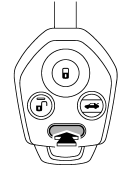
To activate the alarm, press the “PANIC” button once.
The horn will sound and the turn signal lights will flash.
To deactivate the panic alarm, press any button on the remote transmitter. If a button on the remote transmitter is not pressed, the alarm will be deactivated after approximately 30 seconds.
READ NEXT:
 Selecting audible signal operation
Using an electronic chirp, the system will give you an audible signal when the
doors lock and unlock. If desired, you may turn the audible signal off.
To deactivate the audible signal, perform the
Replacing the battery
CAUTION
● Do not let dust, oil or water get on or in the transmitter when replacing the
battery.
● Be careful not to damage the printed circuit board in the transmitter when replacing
Replacing lost transmitters
If you lose a transmitter or want to purchase additional transmitters (up to
four can be programmed), you should reprogram all of your transmitters for security
reasons. It is recommended that you
SEE MORE:
Keyless Entry Control Module
A: REMOVAL
1. SEDAN MODEL
1) Disconnect the ground cable from battery.
2) Remove the rear shelf trim. <Ref. to EI-120, REMOVAL, Rear Shelf Trim.>
3) Remove the keyless entry control module.
Disconnect the connector.
Remove the bolt and remove the keyless entry control module.
2. OUTBACK
Driving your Subaru Outback when tired or sleepy
WARNING
Driving while experiencing fatigue or drowsiness can lead to delayed reactions, impaired judgment, and reduced attentiveness. This significantly increases the risk of serious accidents for you, your passengers, and others on the road.
If you feel tired or sleepy while driving your Subaru O
© 2010-2026 Copyright www.suoutback.com
