
Subaru Outback (BR): Tail/Back-up light (Outback)
Subaru Outback (BR) 2010-2015 Owners Manual / Maintenance and service / Replacing bulbs / Tail/Back-up light (Outback)
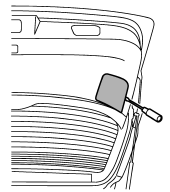
1. Apply a flat-head screwdriver to the light cover as shown in the illustration, and pry the light cover off from the rear gate trim.
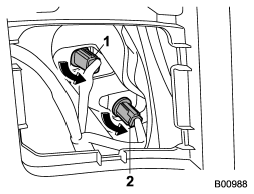
1) Back-up light
2) Tail light
2. Turn the bulb socket counterclockwise and remove it.
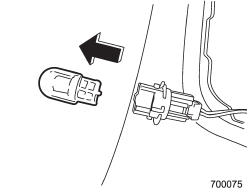
3. Pull the bulb out of the bulb socket and replace it with a new one.
4. Install the bulb socket by turning it clockwise.
5. Install the light cover on the rear gate.
READ NEXT:
 Outback License plate light
1. Remove the mounting screws using a Phillips screwdriver.
2. Remove the lens.
3. Pull the bulb out of the socket.
4. Install a new bulb.
5. Reinstall the lens.
6. Tighten th
Dome light remove bulb
1. Remove the lens by prying the edge of the lens with a flat-head screwdriver.
2. Turn the bulb until the flat surfaces at its ends are aligned vertically.
3. Pull the bulb stra
SEE MORE:
Rocking the vehicle
If you must rock the vehicle to free it from snow, sand, or mud, depress the
accelerator pedal slightly and move the shift lever/select lever back and forth
between “1”/“D” and “R” repeatedly. Do not race the engine. For the best possible
traction, avoid spinning the wheels when tr
Front ABS Wheel Speed Sensor
A: REMOVAL
1) Disconnect the ground cable from battery.
2) Lift up the vehicle, and then remove the front wheels.
3) Remove the front ABS wheel speed sensor.
CAUTION:
Be careful not to damage the sensor.
Do not apply excessive force to the sensor harness.
Disconnect the front ABS wheel speed
© 2010-2026 Copyright www.suoutback.com
