
Subaru Outback (BR): To temporarily cancel the cruise control
The cruise control can be temporarily canceled in the following ways.
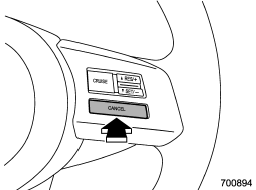
● Press the “CANCEL” button.
● Depress the brake pedal.
● Depress the clutch pedal (MT models only).
● Shift the select lever into the “N” position (AT and CVT models).
● Shift the shift lever into the neutral position (MT models only).
The cruise control set indicator light in the combination meter turns off when the cruise control is canceled.
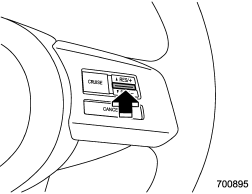
To resume the cruise control after it has been temporarily canceled and with vehicle speed of approximately 20 mph (32 km/h) or more, press the “RES/SET” switch to the “RES” side to return to the original cruising speed automatically.
The cruise control set indicator light in the combination meter will automatically illuminate at this time.
READ NEXT:
 To turn off the cruise control
There are two ways to turn off the cruise control:
● Press the “CRUISE” main switch button again.
● Turn the ignition switch to the “Acc” or “LOCK” position (but only when th
To increase the speed (by the “RES/ SET” switch)
Press the “RES/SET” switch to the “RES” side and hold it until the vehicle reaches
the desired speed. Then, release the switch. The vehicle speed at that moment will
be memorized and tre
SEE MORE:
Front fog light (if equipped)
NOTE
It may be difficult to replace the bulbs. We recommend that you have the bulbs
replaced by your SUBARU dealer if necessary.
1. Pull off the fender lining. Refer to “Pulling off the fender lining” F11-7.
2. Disconnect the electrical connector.
1) For left-hand side
2) For right-ha
Repeating
Type A audio
Type B audio
To repeat a track/file (track), briefly press the “RPT/RDM” button (type A audio)
or “RPT” button (type B audio) while the track/file (track) is playing.
Each time you briefly press the button, the mode changes in the following sequences.
Type A audio:
