
Subaru Outback (BR): Voice command system
Subaru Outback (BR) 2010-2015 Owners Manual / Audio / Hands-free system (if equipped) / Using the Hands-free system / Voice command system
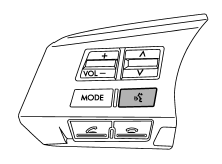
Talk switch
To turn on the voice command system, press the talk switch
 briefly. To turn off the voice command
system, press the talk switch for more
than 1.5 seconds.
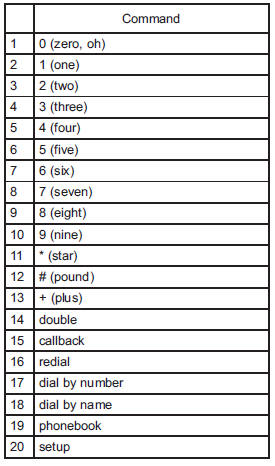
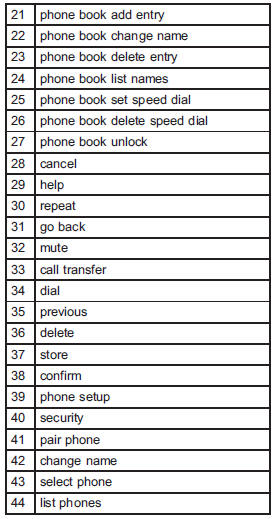
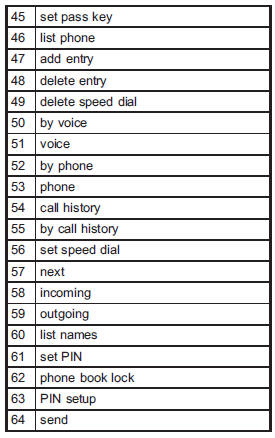
The commands available for the voice command system are listed in the following chart.
READ NEXT:
 Interior light
When leaving your vehicle, make sure the lights are turned off to avoid battery
discharge.
Dome light switch
1) ON
2) DOOR
3) OFF
The dome light switch has three positions:
ON: The light remains on continuously.
OFF: The light remains off.
DOOR: The dome light illuminates automatically in the
SEE MORE:
Locking and unlocking from the outside
To lock the driver’s door from the outside with the key, turn the key toward
the rear. To unlock the door, turn the key toward the front.
Pull the outside door handle to open an unlocked door.
Locking without the key
1) Rotate the lock lever rearward.
2) Close the door.
To lock the door
Registering the phonebook data
1. Input the phone number to be registered. Refer to “Inputting the phone number”
F5-36.
2. Say the name to be registered.
3. “Confirm” is displayed.
4. Press the “TUNE/TRACK/CH” dial.
5. “Stored” is displayed.
6. Select “Speed Dial” by operating the “TUNE/TRACK/CH” di
© 2010-2026 Copyright www.suoutback.com
