
Subaru Outback (BR): Warning and indicator lights in illustrations
Subaru Outback (BR) 2010-2015 Owners Manual / About vehicle / Illustrated index / Warning and indicator lights in illustrations
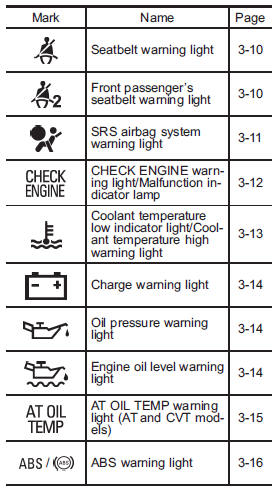
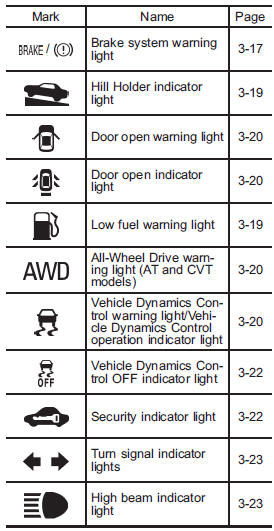
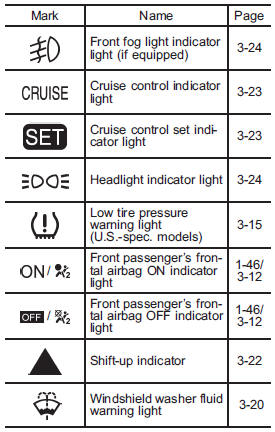
READ NEXT:
 Function settings
A SUBARU dealer can change the settings of the functions shown in the following
table to meet your personal requirements. Contact the nearest SUBARU dealer for
details.
Front seats
WARNING
● Never adjust the seat while driving to avoid the possibility of loss of vehicle
control and of personal injury.
● Before adjusting the seat, make sure the hands and feet of r
SEE MORE:
DTC P0131, P0132, P0133, P0134, P0137, P0138, P013A, P013B, P013E, P013F,
P0140, P0141, P014C, P014D, P015A, P015B
AB:DTC P0131 O2 SENSOR CIRCUIT LOW VOLTAGE (BANK 1 SENSOR 1)
1. OUTLINE OF DIAGNOSIS
Detect the open or short circuit of sensor.
Judge as NG, when the element voltage is out of the specified range.
2. COMPONENT DESCRIPTION
Electromotive force
Air fuel ratio
Lean
Rich
Exhaust gas
ZrO2
3.
Passenger compartment area
1) Lower anchorages for child restraint system (page 1-33)
2) Seatbelt (page 1-12)
3) Center console (page 6-6)
4) Front seat (page 1-2)
5) Rear seat (page 1-7)
1) Top tether anchorages (page 1-36)
2) Cargo area light (page 6-3)
3) Rear center seatbelt (page 1-18)
4) Cargo area cover (pa
© 2010-2026 Copyright www.suoutback.com
