
Subaru Outback (BR): Type B inside mirror (if equipped)
Subaru Outback (BR) 2010-2015 Owners Manual / Instruments and controls / Mirrors / Type B inside mirror (if equipped)
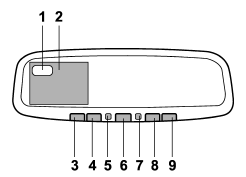
1) Electronic compass display
2) Rear view image display
3) HomeLink® button 1
4) HomeLink® button 2
5) Function indicator
6) HomeLink® button 3
7) Photosensor
8) Power button
9) Compass button
The mirror has the following features.
● Auto-dimming function for anti-glare capability ● Rear view image display ● Electronic compass display ● HomeLink® Wireless Control System
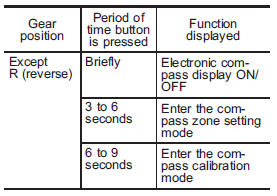
Using the power button and compass button, you can display the various functions of the rear view image display and the electronic compass display based on how long you press the buttons.
Power button
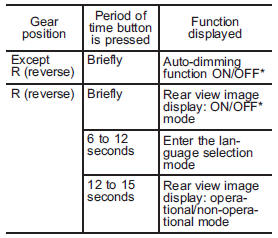
*: The setting returns to “ON” as a default setting every time the ignition switch is turned to the “OFF” position.
Compass button
- Auto-dimming function
- Rear view image display
- Electronic compass display
- HomeLink® Wireless Control System
READ NEXT:
 Auto-dimming function
The auto-dimming function is an anti-glare capability which automatically reduces
glare coming from headlights of vehicles behind you.
By pressing the power button, the autodimming function is togg
Rear view image display
When the ignition switch is in the “ON” position and the transmission is in the
“R” (reverse) position, the rear view camera automatically displays the rear view
image behind the vehicle o
Electronic compass display
By briefly pressing the compass button, the compass display is toggled on or
off. When the compass display is on, an illuminated compass reading will appear
on the mirror.
Using the electronic co
SEE MORE:
Waxing and polishing
Always wash and dry the vehicle before waxing and polishing.
Use a good quality polish and wax and apply them according to the manufacturer’s
instructions. Wax or polish when the painted surface is cool.
Be sure to polish and wax the chrome trim, as well as the painted surfaces. Loss
of wax
Electronic parking brake – if the electronic parking brake cannot be released
WARNING
● When the electronic parking brake cannot be released, the electronic parking
brake system may malfunction. Driving in such conditions may cause an unexpected
accident. Contact your SUBARU dealer for inspection as soon as possible.
● You can release the electronic parking
© 2010-2026 Copyright www.suoutback.com
