
Subaru Outback (BR): Compass calibration zones
Subaru Outback (BR) 2010-2015 Owners Manual / Instruments and controls / Mirrors / Auto-dimming mirror with compass (if equipped) / Compass calibration zones
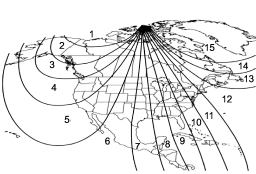
Calibration Zones for Compass
1. Check the "Compass calibration zones" map displayed above to ensure that the compass zone setting matches your geographic area accurately.
2. Hold down the switch for 6 seconds until the zone selection menu appears (a number will appear in the mirror compass window).
3. Press the switch multiple times until the appropriate zone setting for your location is shown.
4. Let go of the button after 10 seconds to exit the zone setting mode.
READ NEXT:
 Compass calibration
1. If a “C” is displayed in the compass window, the compass needs to be calibrated.
2. Drive the vehicle in a circle at 5 mph (8 km/h) or less until the display reads
a direction.
3. You can a
Auto-dimming mirror with compass and HomeLink® (if equipped)
1) HomeLink® button 1
2) HomeLink® button 2
3) LED
4) HomeLink® button 3
5) Sensor
6) Automatic dimming on/off button
7) Compass display button
8) Compass display
The auto-dimming mirror
Photosensors
The mirror has a photosensor attached on both the front and back sides. During
nighttime driving, these sensors detect distracting glare from vehicle headlights
behind you and automatically dim
SEE MORE:
Rear center seating position
CAUTION
The head restraint is not intended to be used at the lowest position. Before sitting on the seat, raise the head restraint to the extended position.
A) When not used (retracted position) B) When used (extended position)
1) Head restraint
2) Release button
To raise:
Intake (Induction)
General Description
A: COMPONENT
Air intake duct
Clip
Resonator chamber
Air cleaner case (front)
Spacer
Cushion
Air cleaner element
Air cleaner case (rear)
Clip
Clamp
Cover
Clip
Air intake boot ASSY
Clamp
Cushion
Mass air flow and intake air temperature
sensor
Blow-by hose
Clip
© 2010-2026 Copyright www.suoutback.com
