
Subaru Outback (BR): Channel selection by operating the dial
Subaru Outback (BR) 2010-2015 Owners Manual / Audio / Satellite radio operation (if equipped) / Channel and category selection / Channel selection by operating the dial
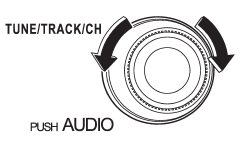
Turn the “TUNE/TRACK/CH” dial clockwise to select the next channel and turn the “TUNE/TRACK/CH” dial counterclockwise to select the previous channel.
READ NEXT:
 Channel selection by pressing the button
When in the SAT mode, briefly press the “SEEK” button “”
or “” to select the channel.
Skip channel selection
When in the SAT mode, press the “SEEK” button “”
or “” continuously to change to the
channel selection mode. Pressing the “SEEK” button “”
changes the channel up by 10 step
Category selection
To activate the category search mode, press the “PTY/CAT” button. To deactivate
the category search mode, press the “PTY/CAT” button again.
When in the category search mode, pressing th
SEE MORE:
ABS warning light
The ABS warning light illuminates when the ignition switch is turned to the “ON”
position and turns off after approximately 2 seconds.
This is an indication that the ABS system is working properly.
CAUTION
● If any of the following conditions occur, we recommend that you have the AB
CD player operation
NOTE
● Make sure to always insert a disc with the label side up. If a disc is inserted
with the label side down, the player displays “CHECK DISC”. Refer to “When the following
messages are displayed” F5-27.
● If a disc is inserted during a radio broadcast, the disc will int
© 2010-2026 Copyright www.suoutback.com
