
Subaru Outback (BR): When selecting a CD to play (type B)
Subaru Outback (BR) 2010-2015 Owners Manual / Audio / CD player operation / How to play back a CD / When selecting a CD to play (type B)
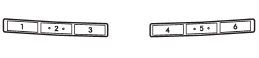
Disc select buttons
Press a desired one of the disc select buttons the disc number indicator of which steadily lights up. The player will then start playback of the selected CD, beginning with the first track.
READ NEXT:
 Forward direction
Turn the “TUNE/TRACK/CH” dial clockwise to skip to the beginning of the next
track/file (track). Each time the dial is turned, the indicated track/file (track)
number will increase.
NOTE
I
Backward direction
Turn the “TUNE/TRACK/CH” dial counterclockwise to skip to the beginning of the
current track/file (track). Each time the dial is turned, the indicated track/file
(track) number will decrease
SEE MORE:
Airflow mode selection button
Select the desired airflow mode by pressing the airflow mode selection button.
The selected airflow mode is shown on the display.
There are four airflow modes that activate the following air outlets.
(Ventilation): Instrument panel
outlets
(Bi-level): Instrument panel outlets
and foot o
Automatic Transmission Fluid level, Differential Gear Oil
A: INSPECTION
NOTE: The level of ATF varies with fluid temperature. Pay attention to the ATF temperature when checking ATF level.
1) Raise the ATF temperature by driving a distance of 5 to 10 km (3 to 6 miles). Otherwise, idle the engine to raise ATF temperature to 70 - 80ºC (158 - 176ºF
© 2010-2026 Copyright www.suoutback.com
