
Subaru Outback (BR): Backward direction
Subaru Outback (BR) 2010-2015 Owners Manual / Audio / CD player operation / To select a track from its beginning / Backward direction
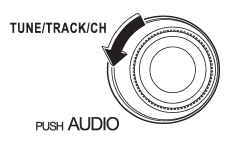
Turn the “TUNE/TRACK/CH” dial counterclockwise to skip to the beginning of the current track/file (track). Each time the dial is turned, the indicated track/file (track) number will decrease.
NOTE
In an MP3, WMA or AAC folder, skipping past the first track/file (track) will take you to the last track/file (track) in the folder.
READ NEXT:
 Fast-forwarding
Press the “” side of the “SEEK” button
continuously to fast-forward the track/file. Release the button to stop fast-forwarding.
NOTE
If you fast-forward to the end of the last track/file
Repeating
Type A audio
Type B audio
To repeat a track/file (track), briefly press the “RPT/RDM” button (type A audio)
or “RPT” button (type B audio) while the track/file (track) is playing.
Eac
SEE MORE:
Cooling fan, hose and connections
Your vehicle employs an electric cooling fan which is thermostatically controlled
to operate when the engine coolant reaches a specific temperature.
If the radiator cooling fan does not operate even when the coolant temperature
high warning light illuminates, the cooling fan circuit may be defe
Malfunction Indicator Light
A: PROCEDURE
B: ACTIVATION OF MALFUNCTION
INDICATOR LIGHT
1) When the ignition switch is turned to ON (engine
OFF), the malfunction indicator light (A) in the combination
meter illuminates.
NOTE:
If the malfunction indicator light does not illuminate,
perform diagnostics of the malfunction indicat
© 2010-2026 Copyright www.suoutback.com
