
Subaru Outback (BR): Fast-forwarding
Subaru Outback (BR) 2010-2015 Owners Manual / Audio / CD player operation / Fast-forwarding and fast-reversing / Fast-forwarding
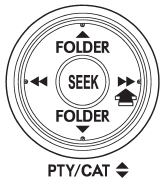
Press the “ ” side of the “SEEK” button
continuously to fast-forward the track/file. Release the button to stop fast-forwarding.
NOTE
If you fast-forward to the end of the last track/file (track), fast-forwarding will stop and the player will start playback beginning with the first track/file (track).
Fast-reversing
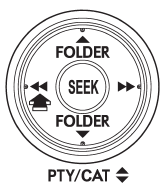
Press the “ ” side of the “SEEK” button
continuously to fast-reverse the track/file. Release the button to stop fast-reversing.
NOTE
If you fast-reverse to the beginning of the first track/file (track), fast-reversing will stop and the player will start playback.
READ NEXT:
 Repeating
Type A audio
Type B audio
To repeat a track/file (track), briefly press the “RPT/RDM” button (type A audio)
or “RPT” button (type B audio) while the track/file (track) is playing.
Eac
Random playback
Type A audio
Type B audio
To play back a track/file(s) at random, press the “RPT/RDM” button for 0.5 second
or longer (type A audio) or press the “RDM” button (type B audio).
●
Scan
The scan mode lets you listen to the first 10 seconds of each track/file in succession.
Press the “SCAN” button to start scanning upward beginning with the track/ file(s)
following the curre
SEE MORE:
Entering the vehicle while it is running via remote start
1. Unlock the vehicle doors using the remote keyless entry system. If the vehicle’s
doors are unlocked manually using the key, the vehicle’s alarm system will trigger
(if the alarm system is armed prior to activating the remote engine start system)
and the engine will turn off. Inserting t
Operating Cylinder
A: REMOVAL
NOTE:
The illustration below is suitable for every model.
Perform the same procedures for the other models.
1) Remove the collector cover. (turbo model)
2) Remove the air intake boot assembly. (non-turbo
model) <Ref. to IN(H4SO)-8, REMOVAL, Air Intake
Boot.>
3) Remove the interc
© 2010-2026 Copyright www.suoutback.com
