
Subaru Outback (BR): Menu list of the Hands-free system
Subaru Outback (BR) 2010-2015 Owners Manual / Audio / Hands-free system (if equipped) / Using the Hands-free system / Menu list of the Hands-free system
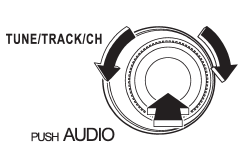
Turn the “TUNE/TRACK/CH” dial to select a menu, and then press the dial to enter the selected menu.
NOTE
For details about the operation, follow the voice guidance.
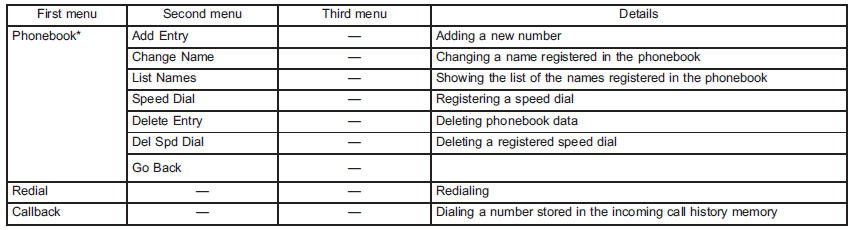
*: If a cell phone is not registered, the menu described in the chart is not indicated.
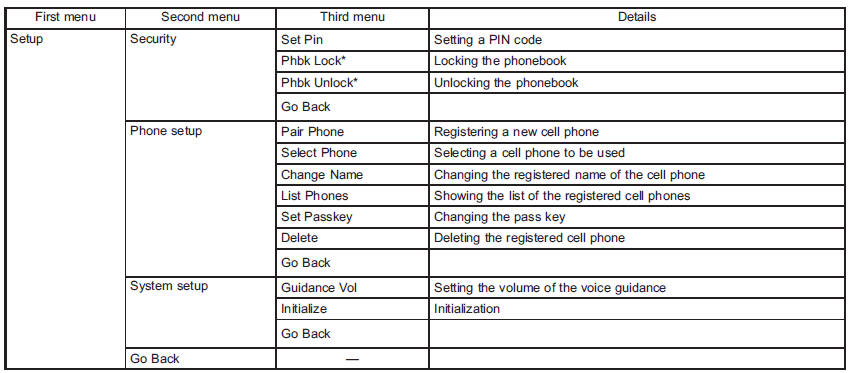
*: If a PIN code is not registered, the menu described in the chart is not available.
READ NEXT:
 Voice command system
Talk switch
To turn on the voice command system, press the talk switch
briefly. To turn off the voice command
system, press the talk switch for more
than 1.5 seconds.
The commands available
Interior light
When leaving your vehicle, make sure the lights are turned off to avoid battery
discharge.
SEE MORE:
Repeating
Type A audio
Type B audio
To repeat a track/file (track), briefly press the “RPT/RDM” button (type A audio)
or “RPT” button (type B audio) while the track/file (track) is playing.
Each time you briefly press the button, the mode changes in the following sequences.
Type A audio:
How to use as crossbars
CAUTION
● Do not raise the bar higher than necessary. The base of the bar may be damaged.
● Be careful not to contact the bars while sliding them. Otherwise, the bars may
be scratched or the latch portions may be damaged.
● Do not slide the bar more than necessary when sliding
© 2010-2026 Copyright www.suoutback.com
