
Subaru Outback (BR): Vehicle Dynamics Control OFF switch
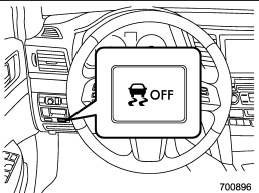
Pressing the switch to deactivate the Vehicle Dynamics Control system can facilitate the following operations.
● a standing start on a steeply sloping road with a snowy, gravel-covered, or otherwise slippery surface
● extrication of the vehicle when its wheels are stuck in mud or deep snow
When the switch is pressed during engine operation, the Vehicle Dynamics Control OFF indicator light on the combination meter illuminates. The Vehicle Dynamics Control system will be deactivated. When the switch is pressed again to reactivate the Vehicle Dynamics Control system, the Vehicle Dynamics Control OFF indicator light turns off.
You should not deactivate the Vehicle Dynamics Control system except under the above-mentioned situations.
CAUTION
The Vehicle Dynamics Control system helps prevent unstable vehicle motion such as skidding using control of the brakes and engine power. Do not turn off the Vehicle Dynamics Control system unless it is absolutely necessary. If you must turn off the Vehicle Dynamics Control system, drive very carefully based on the road surface condition.
NOTE
● When the switch has been pressed to deactivate the Vehicle Dynamics Control system, the Vehicle Dynamics Control system automatically reactivates itself the next time the ignition switch is turned to the “LOCK” position and the engine is restarted.
● If the switch is held down for 10 seconds or longer, the indicator light turns off, the Vehicle Dynamics Control system is activated, and the system ignores any further pressing of the switch. To make the switch usable again, turn the ignition switch to the “LOCK” position and restart the engine.
● When the switch is pressed to deactivate the Vehicle Dynamics Control system, the vehicle’s running performance is comparable with that of a vehicle that does not have a Vehicle Dynamics Control system. Do not deactivate the Vehicle Dynamics Control system except when absolutely necessary.
● Even when the Vehicle Dynamics Control system is deactivated, components of the brake control system may still activate. When the brake control system is activated, the Vehicle Dynamics Control operation indicator light illuminates.
READ NEXT:
 Basic information about tire pressure monitoring system (TPMS)
The tire pressure monitoring system alerts the driver by transmitting a signal from a sensor in each wheel when tire pressure drops significantly.
This system activates when the vehicle rea
Parking your vehicle
WARNING
● Never leave unattended children or pets in the vehicle. They could accidentally
injure themselves or others through inadvertent operation of the vehicle. Also,
on hot or sunny day
Electronic parking brake
1) Parking brake switch
2) Hill Holder switch
3) Indicator light
WARNING
● Before exiting the vehicle, make sure that you turn off the engine. Otherwise,
the parking brake may be release
SEE MORE:
Clutch Disc and Cover
A: REMOVAL
1) Remove the transmission assembly from vehicle
body. <Ref. to 6MT-25, REMOVAL, Manual Transmission
Assembly.>
2) Attach the ST to the flywheel.
ST 499747100 CLUTCH DISC GUIDE
Clutch cover
3) Remove the clutch cover and clutch disc.
NOTE:
Take care not to allow oil to touch
Fast-forwarding
Press the “” side of the “SEEK” button
continuously to fast-forward the track/file. Release the button to stop fast-forwarding.
NOTE
If you fast-forward to the end of the last track/file (track), fast-forwarding
will stop and the player will start playback beginning with the first tr
