
Subaru Outback (BR): Adjustable level of each mode
Subaru Outback (BR) 2010-2015 Owners Manual / Audio / Power and sound controls / Adjustable level of each mode
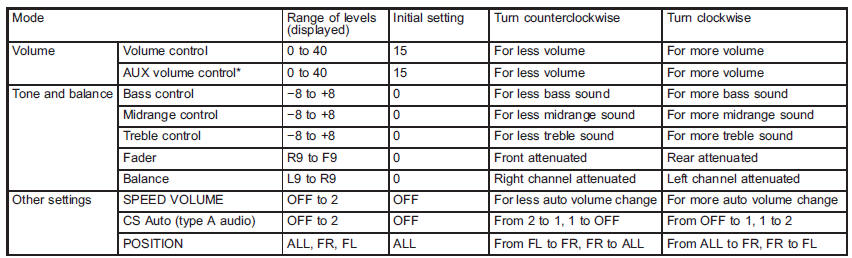
*Only when an AUX audio product is connected.
READ NEXT:
 FM/AM radio operation
Press the “FM” or “AM” button when the radio is off to turn on the radio.
FM selection
Press the “FM” button when the radio is on to select FM1, FM2 or FM3 reception.
Each brief press of the “FM” button changes the radio in the following sequence
starting from the last FM r
AM selection
Press the “AM” button when the radio is on to select AM reception.
SEE MORE:
Outback License plate light
1. Remove the mounting screws using a Phillips screwdriver.
2. Remove the lens.
3. Pull the bulb out of the socket.
4. Install a new bulb.
5. Reinstall the lens.
6. Tighten the mounting screws.
Relay and Fuse, Power Window System
A: LOCATION
NOTE: For other related fuses, refer to the wiring diagram. <Ref. to WI-15, Power Supply Circuit.>
B: INSPECTION
1. CHECK FUSE.
1) Remove the fuse and check visually.
2) If the fuse is blown out, replace the fuse.
2. CHECK RELAY
1) Check the resistance between relay ter
© 2010-2026 Copyright www.suoutback.com
