
Subaru Outback (BR): FM selection
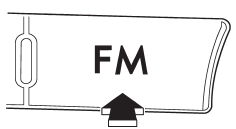
Press the “FM” button when the radio is on to select FM1, FM2 or FM3 reception.
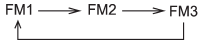
Each brief press of the “FM” button changes the radio in the following sequence starting from the last FM radio band that you selected.
READ NEXT:
 AM selection
Press the “AM” button when the radio is on to select AM reception.
Manual tuning
Turn the “TUNE/TRACK/CH” dial clockwise to increase the tuning frequency and
turn the “TUNE/TRACK/CH” dial counterclockwise to decrease it.
Each time the dial is turned, the frequency int
SEE MORE:
Rear gate (Outback) – if the rear gate cannot be unlocked
In the event that you cannot unlock the rear gate by operating the power door
locking switches or the remote keyless entry system, you can unlock it from inside
the cargo area.
1. Remove the access cover at the bottom-center of the rear gate trim using flat-head
screwdriver.
2. Locate the
General Description of Trim
A: COMPONENT
1. FRONT UNDER COVER
Small type
Medium type
Large type
Tightening torque: N*m (kgf-m, ft-lb)
T: 17.5 (1.78, 12.9)
2. FLOOR UNDER PROTECTOR
Tightening torque: N*m (kgf-m, ft-lb)
T: 7.5 (0.76, 5.5)
3. FUEL TANK PROTECTOR
Fuel tank protector RH
F
© 2010-2026 Copyright www.suoutback.com
