
Subaru Outback (BR): Air inlet selection button (Automatic climate control system)
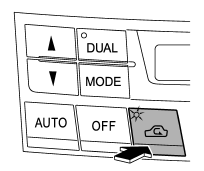
Select airflow by pressing the air inlet selection button “ ”.
”.
ON position (recirculation): Interior air is recirculated inside the vehicle. Press the air inlet selection button to the ON position for fast cooling with the air conditioner or when driving on a dusty road. The indicator light will illuminate.
OFF position (outside Air): Outside air is drawn into the passenger compartment. Press the air inlet selection button to the OFF position when the interior has cooled to a comfortable temperature and the road is no longer dusty. The indicator light will turn off.
WARNING
Continued operation in the ON position (recirculation) may fog up the windows. Switch to the OFF position (outside air) as soon as the outside dusty condition clears.
NOTE
When driving on a dusty road or behind a vehicle that emits unpleasant exhaust gases, set the air inlet selection button to the ON position (recirculation).
From time to time, return the air inlet selection button to the OFF position (outside air) to draw outside air into the passenger compartment.
READ NEXT:
 Temperature sensors
1) Solar sensor
2) Interior air temperature sensor
The automatic climate control system employs several sensors. These sensors are
delicate. If they are treated incorrectly and become damaged, t
Cleaning ventilator grille
Always keep the front ventilator inlet grille free of snow, leaves, or other
obstructions to ensure efficient heating and defrosting. Since the condenser is
located in front of the radiator, thi
SEE MORE:
Ignition switch light
For easy access to the ignition switch in the dark, the ignition switch light
illuminates when driver’s door is opened or when the driver’s door is unlocked using
the remote keyless entry transmitter.
The light remains illuminated for approximately 30 seconds and gradually turns
off under
SRS airbag operation
The SRS side airbag and SRS curtain airbag can function only when the ignition switch is in the “ON” position.
The driver’s and front passenger’s SRS side airbags and SRS curtain airbags deploy independently of each other because each has its own impact sensor. T
