
Subaru Outback (BR): Canada-spec. models
Subaru Outback (BR) 2010-2015 Owners Manual / About vehicle / Illustrated index / Combination meter / Canada-spec. models
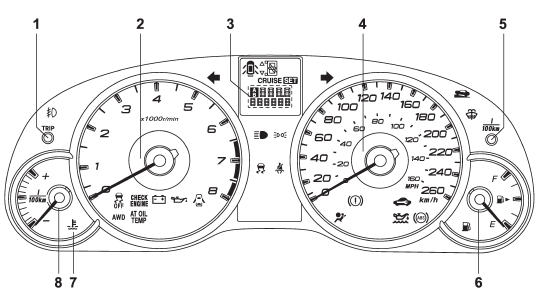
1) Trip meter A/B selection and trip meter reset knob (page 3-6) 2) Tachometer (page 3-7) 3) Trip meter and odometer (page 3-6) 4) Speedometer (page 3-6) 5) Multi function display switching knob (page 3-25) 6) Fuel gauge (page 3-7) 7) Coolant temperature warning/indicator light (page 3-13) 8) ECO gauge (page 3-8)
READ NEXT:
 Function settings
A SUBARU dealer can change the settings of the functions shown in the following
table to meet your personal requirements. Contact the nearest SUBARU dealer for
details.
SEE MORE:
Tire replacement
The wheels and tires are important and integral parts of your vehicle’s design;
they cannot be changed arbitrarily. The tires fitted as standard equipment are optimally
matched to the characteristics of the vehicle and were selected to give the best
possible combination of running performanc
Front Hood
A: REMOVAL
1. FRONT HOOD INSULATOR
Release the clips to remove the front hood insulator.
CAUTION:
Do not reuse any clips damaged during removal. The damaged clip cannot fix the
insulator securely.
Therefore, always replace with a new part.
2. FRONT HOOD SEAL
Remove the clip, and remove the seal.
© 2010-2026 Copyright www.suoutback.com
