
Subaru Outback (BR): Dome light switch
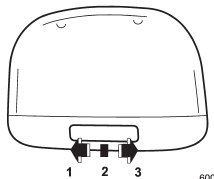
1) ON
2) DOOR
3) OFF
The dome light switch has three positions:
ON: The light remains on continuously.
OFF: The light remains off.
DOOR: The dome light illuminates automatically in the following cases.
● Any of the doors or the rear gate (Outback) is opened.
● The doors or the rear gate (Outback) are unlocked using the remote keyless entry transmitter.
● The ignition switch is turned from the “Acc” position to the “LOCK” position. The automatically illuminated dome light remains on for several seconds and then gradually turns off after all doors and the rear gate (Outback) are closed. While the light is on, if any of the following operations are performed, the dome light turns off immediately.
● The ignition switch is turned from the “LOCK” position to “Acc” or “ON” position.
● All doors and the rear gate (Outback) are locked using the remote keyless entry transmitter.
The setting of the period for which the light remains on (OFF delay timer) can be changed by a SUBARU dealer. Contact your SUBARU dealer for details.
READ NEXT:
 Map light models and functioning
Models with moonroof
Models without moonroof
To turn on the map light, press the switch.
To turn it off, press the switch again.
When leaving the vehicle, make sure the lights
Door interlock switch
1) Door interlock switch
Although the map light switches are in the OFF position (manually off), the map
lights can be set to illuminate automatically in conjunction with a door opening,
etc. b
Cargo area light (Outback)
1) DOOR
2) OFF
3) ON
The cargo area light switch has three positions.
DOOR: The light illuminates only when the rear gate is opened.
OFF: The light remains off.
ON: The light remains on contin
SEE MORE:
Windshield Glass
A: REMOVAL
1. USING WINDSHIELD GLASS KNIFE
1) Disconnect the ground cable from battery. (Models with wiper deicer)
2) Remove the front pillar trim. <Ref. to EI-102, REMOVAL, Upper Inner Trim.>
3) Disconnect the wiper deicer connector. (Models with wiper deicer)
4) Remove the cowl panel. &l
Pulling off the fender lining
It is necessary to pull off the fender lining when replacing some bulbs.
1. Start the engine and turn the steering wheel fully in the opposite direction
of the bulb to be replaced.
2. Stop the engine.
3. Remove the clip from the fender lining. Refer to “Type B clips” F11-5.
4. Pull off
