
Subaru Outback (BR): Door step light
Subaru Outback (BR) 2010-2015 Owners Manual / Maintenance and service / Replacing bulbs / Door step light
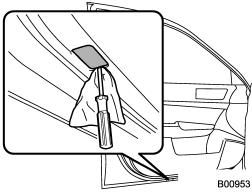
1. Remove the lens by prying the edge of the lens with a flat-head screwdriver.
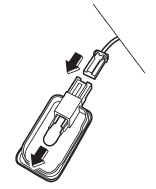
2. Pull the bulb out of the socket.
3. Install a new bulb.
4. Reinstall the lens.
READ NEXT:
 Cargo area light (Outback) bulb replacing
1. Remove the lens by prying the edge of the lens with a flat-head screwdriver.
2. Pull the bulb out of the socket.
3. Install a new bulb.
4. Reinstall the lens.
Other bulbs
Other bulbs may be difficult to replace. We recommend that you have the bulbs
replaced by your SUBARU dealer if necessary.
SEE MORE:
Charge warning light
If this light illuminates when the engine is running, it may indicate that the
charging system is not working properly.
If the light illuminates while driving or does not turn off after the engine
starts, stop the engine at the first safe opportunity and check the alternator belt.
If the be
Clutch Disc and Cover
A: REMOVAL
1) Remove the transmission assembly from vehicle
body. <Ref. to 6MT-25, REMOVAL, Manual Transmission
Assembly.>
2) Attach the ST to the flywheel.
ST 499747100 CLUTCH DISC GUIDE
Clutch cover
3) Remove the clutch cover and clutch disc.
NOTE:
Take care not to allow oil to touch
© 2010-2026 Copyright www.suoutback.com
