
Subaru Outback (BR): Fan speed control dial
Subaru Outback (BR) 2010-2015 Owners Manual / Climate control / Manual climate control system (if equipped) / Manual climate Control panel / Fan speed control dial
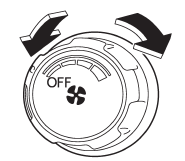
The fan operates only when the ignition switch is turned to the “ON” position. The fan speed control dial is used to select four fan speeds.
READ NEXT:
 Temperature control dial
This dial regulates the temperature of airflow from the air outlets over a range
from the blue side (cool) to red side (warm).
Airflow control buttons
Each airflow control button activates the following air outlets.
: Instrument panel outlets
: Instrument panel outlets and foot
outlets
: Foot outlets, both side outlets of
the instrument p
Air conditioner button
The air conditioner operates only when the engine is running.
Press the air conditioner button while the fan is in operation to turn on the
air conditioner. The indicator light will illuminate.
SEE MORE:
Instrument Panel Lower Cover
A: REMOVAL
1) Disconnect the ground cable from battery.
2) Remove the clips, and remove the instrument panel side cover LH.
3) Remove the instrument panel lower cover.
Remove the clips and data link connector, and remove the instrument
panel lower cover under.
Remove the screws and clips a
Shift lock release
If the select lever cannot be operated, turn the ignition switch back to the
“ON” position then move the select lever to the “P” position with the select lever
button pressed and brake pedal depressed. If the select lever does not move after
performing the above procedure, perform the
© 2010-2026 Copyright www.suoutback.com
