
Subaru Outback (BR): Power switch and volume control
Subaru Outback (BR) 2010-2015 Owners Manual / Audio / Power and sound controls / Power switch and volume control
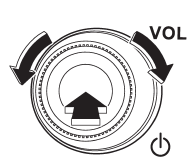
The dial is used for both power (ON/OFF) and volume control. The radio is turned ON and OFF by pressing the dial, and the volume is controlled by turning the dial.
READ NEXT:
 Tone and balance control
Each brief press of the “TUNE/TRACK/ CH” dial changes the control modes in the
following sequence.
Choose the desired level for each mode by turning the “TUNE/TRACK/CH” dial. The
cont
Other sound setting controls (type A audio)
Each brief press of the “MENU” button changes the control modes in the following
sequence.
Choose the desired settings for each mode by turning the “TUNE/TRACK/CH” dial.
The control fu
SEE MORE:
Average fuel consumption
1) U.S.-spec. models
2) Except U.S.-spec. models
This indication shows the average rate of fuel consumption since the trip meter
was last reset.
Pressing the trip knob toggles the indication between the average fuel consumption
corresponding to the A trip meter indication and the average fu
Crankshaft Position Sensor
A: REMOVAL
1) Disconnect the ground cable from battery.
2) Remove the bolt which secures crankshaft position
sensor to oil pump.
3) Remove the crankshaft position sensor, and disconnect
the connector from the crankshaft position
sensor.
B: INSTALLATION
Install in the reverse order of removal.
Tig
© 2010-2026 Copyright www.suoutback.com
