
Subaru Outback (BR): To arm the system using remote transmitter
1. Close all windows and the moonroof (if equipped).
2. Remove the key from the ignition switch.
3. Open the doors and get out of the vehicle.
4. Make sure that the engine hood (and the trunk lid (Legacy)) are locked.
5. Close all doors (and the rear gate (Outback)).
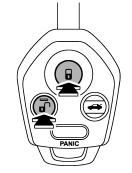

6. Briefly press the “ ” button (for
less than 2 seconds). All doors (and the rear gate (Outback)) will lock, an electronic
chirp will sound once, the turn signal lights will flash once, and the security
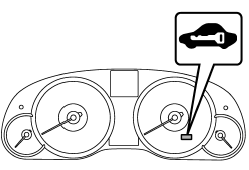
indicator light will start flashing rapidly. After rapid flashing for 30 seconds
(standby time), the security indicator light will then flash slowly (twice approximately
every 2 seconds), indicating that the system has been armed for surveillance.
If any of the doors (rear gate or trunk lid) is not fully closed, an electronic chirp sounds five times, the turn signal lights flash five times to alert you that the doors (or the rear gate) are not properly closed. When you close the door, the system will automatically arm and doors will automatically lock.
READ NEXT:
 To arm the system using power door locking switch
1. Close all windows.
2. Remove the key from the ignition switch.
3. Open the doors and get out of the vehicle.
4. Make sure that the engine hood is locked.
5. Close the doors (and the rear gate (
Disarming the system
Briefly press the “” button (for
less than 2 seconds) on the remote transmitter. The driver’s door will unlock, an
electronic chirp will sound twice, the turn signal lights will flash twice
Emergency disarming
If you cannot disarm the system using the transmitter (i.e. the transmitter is
lost, broken or the transmitter battery is too weak), you can disarm the system
without using the transmitter.
The s
SEE MORE:
Installation of child restraint systems by use of lower and tether anchorages
(LATCH)
WARNING
● Child restraint systems and seatbelts can become hot in a vehicle that has
been closed up in sunny weather; they could burn a small child. Check the child
restraint system before you place a child in it.
● Do not leave an unsecured child restraint system in your vehicle.
How to re-stow bars
CAUTION
Do not use the bars as roof rails when the bars are stowed.
1. Pull out the crossbars from the roof rail holders by pulling up the covers.
2. Slide the bars in the direction shown in the illustration.
3. Install the bars into the holders.
4. Make sure that the latches are fitted s
