
Subaru Outback (BR): Type B audio set (if equipped)
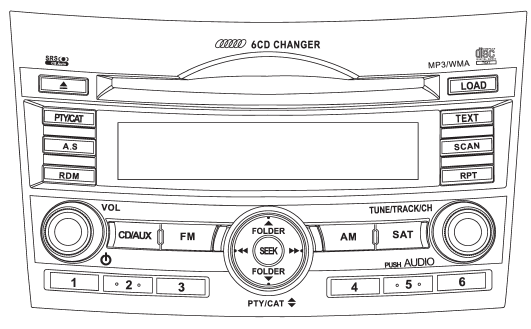
The audio set will operate only when the ignition switch is in the “Acc” or “ON” position.
● Power and sound controls: refer to page 5-6 ● Radio operation: refer to page 5-9 ● Satellite radio operation (if equipped): refer to page 5-13 ● CD (compact disc) player operation: refer to page 5-18 ● Auxiliary input jack: refer to page 5-28
READ NEXT:
 Power switch and volume control
The dial is used for both power (ON/OFF) and volume control. The radio is turned
ON and OFF by pressing the dial, and the volume is controlled by turning the dial.
SEE MORE:
Satellite radio reception
Satellite radio signals are best received in areas with a clear view of the open
sky. In areas where there are tall buildings, trees, tunnels or other structures
that may obstruct the signal of the satellites, there may be signal interruptions.
Other circumstances that may result in signal los
Child restraint systems
Infants and small children should always be placed in an infant or child restraint
system in the rear seat while riding in the vehicle.
You should use an infant or child restraint system that meets Federal Motor Vehicle
Safety Standards or Canada Motor Vehicle Safety Standards, is compatible
© 2010-2026 Copyright www.suoutback.com
