
Subaru Outback (BR): Windshield wiper blade assembly
Subaru Outback (BR) 2010-2015 Owners Manual / Maintenance and service / Replacement of wiper blades / Windshield wiper blade assembly
1. Raise the wiper arm off the windshield.
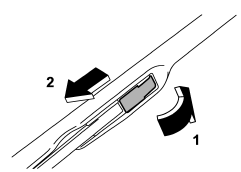
1) Open the cover
2) Pull down the wiper blade
2. Remove the wiper blade assembly by opening the cover and pulling it down in the direction shown in the illustration.
3. Install the wiper blade assembly to the wiper arm. Make sure that it locks in place.
4. Hold the wiper arm by hand and slowly lower it in position.
READ NEXT:
 Windshield wiper blade rubber
1) Support
1. Grasp the locked end of the blade rubber assembly and pull it firmly until
the stoppers on the rubber are free of the support.
1) Metal spines
2. If the new blade rubber is not
Rear window wiper blade assembly (Outback)
1. Raise the wiper arm off the rear window.
2. Turn the wiper blade assembly counterclockwise.
3. Pull the wiper blade assembly toward you to remove it from the wiper arm.
Rear window wiper blade rubber (Outback)
1. Pull out the end of the blade rubber assembly to unlock it from the plastic
support.
2. Pull the blade rubber assembly out of the plastic support.
1) Metal spines
3. If the new blade rub
SEE MORE:
Rear Inner Remote
A: REMOVAL
1) Remove the door trim. <Ref. to EI-60, REMOVAL, Door Trim.>
2) Remove the screws and detach the rear inner remote handle.
B: INSTALLATION
1) Before installation, check the following items.
Cable is free from deformation such as fray.
Grease is applied sufficiently to cable jo
Immobilizer system
This light blinks approximately 60 seconds after the ignition switch is turned from “ON” position to the “Acc” or “LOCK” position or immediately after the key is pulled out. Refer to “Immobilizer” F2-3. If the indicator light does not flash, it may
© 2010-2026 Copyright www.suoutback.com
