
Subaru Outback (BR): Locking the doors
Subaru Outback (BR) 2010-2015 Owners Manual / Keys and doors / Remote keyless entry system / Locking the doors
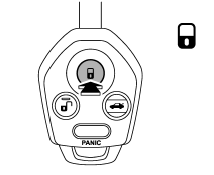
Press the “ ” button to lock all doors
and rear gate (Outback). An electronic chirp will sound once and the turn signal
lights will flash once.
If any of the doors (or the rear gate/trunk lid) is not fully closed, an electronic chirp will sound five times and the turn signal lights will flash five times to alert you that the doors (or the rear gate/trunk lid) are not properly closed. When you close the door, it will automatically lock and then an electronic chirp will sound once and the turn signal lights will flash once.
READ NEXT:
 Unlocking the doors
Press the “” button to unlock the
driver’s door. An electronic chirp will sound twice and the turn signal lights will
flash twice. To unlock all doors and the rear gate (Outback), briefly
Unlocking the rear gate (Outback)
Pressing the “” button unlocks the
rear gate.
An electronic chirp will sound twice and the turn signal lights will flash twice.
Vehicle finder function
Use this function to find your vehicle parked among many vehicles in a large
parking lot. Provided you are within 30 feet (10 meters) of the vehicle, pressing
the “” button three times in a 5-
SEE MORE:
Front Sub Sensor
A: REMOVAL
1) Disconnect the ground cable from battery and wait for at least 60 seconds
before starting work.
2) Remove the front bumper face assembly.
Remove the clips, turn over the front mud guard, and disconnect the fog
light connector. (Model with
fog light)
Remove the clips at the u
LAN System - List of Diagnostic Trouble Code (DTC)
A: LIST
1. DTC TABLE
NOTE: When more than one DTC codes are recorded, referring to their combination and indicator display in the combination meter will make it easy to identify the possible cause. Refer to the list for typical examples.
Diagnostic Procedure with
© 2010-2026 Copyright www.suoutback.com
