
Subaru Outback (BR): Select lever/gear position indicator
Subaru Outback (BR) 2010-2015 Owners Manual / Instruments and controls / Warning and indicator lights / Select lever/gear position indicator
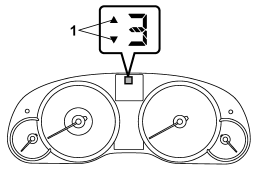
1) Upshift/downshift indicator (AT and CVT models)
This indicator shows the position of the shift lever (MT models) or select lever (AT and CVT models).
READ NEXT:
 Upshift/downshift indicator (AT and CVT models)
When the manual mode is selected, the gear position indicator (which shows the
current gear selection) and the upshift/ downshift indicator light up. Refer to
“Automatic transmission/Continuousl
Gear position indicator setting (MT models)
The gear position indicator light can be activated or deactivated by performing
the following procedure.
1. Turn the ignition switch to the “LOCK” position.
2. Press the trip knob to show “
Turn signal indicator lights
These lights show the operation of the turn signal or lane change signal.
If the indicator lights do not blink or blink rapidly, the turn signal bulb may
be burned out. Replace the bulb as soon a
SEE MORE:
Ventilation
To force outside air through the instrument panel outlets:
1. Set the air inlet selection button to the OFF position.
2. Press the “” button.
3. Set the temperature control dial all the way left.
4. Set the fan speed control dial to the desired speed.
When driving on a dusty road, set the a
New vehicle break-in driving – the first 1,000 miles (1,600 km)
The performance and long life of your vehicle are dependent on how you handle
and care for your vehicle while it is new. Follow these instructions during the
first 1,000 miles (1,600 km):
● Do not race the engine. And do not allow engine speed to exceed 4,000 rpm except
in an emergency.
© 2010-2026 Copyright www.suoutback.com
