
Subaru Outback (BR): Category selection
Subaru Outback (BR) 2010-2015 Owners Manual / Audio / Satellite radio operation (if equipped) / Channel and category selection / Category selection
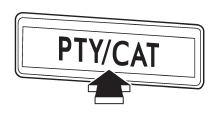
To activate the category search mode, press the “PTY/CAT” button. To deactivate the category search mode, press the “PTY/CAT” button again.
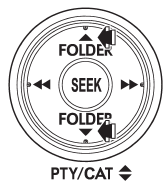
When in the category search mode, pressing the “FOLDER” button “ ”
changes the category up by one step. Pressing “ ”
changes the category down by one step.
When a category is selected, pressing the “SEEK” button selects channels only within the selected category.
The control function returns to the normal mode after approximately 10 seconds.
READ NEXT:
 Channel scan
If you press the “SCAN” button while the radio is in the category search mode,
the radio turns to the category SCAN mode. In the category SCAN mode, the radio
scans only channels in the sele
Preset buttons
How to preset channels
1. Press the “SAT” button to select SAT1, SAT2 and SAT3 reception.
2. Select the desired channel.
3. Press one of the preset buttons for more than 1.5 seconds to store th
SEE MORE:
Ejecting all discs from the player (all disc ejection mode)
1. If you press the “” button for
1.5 seconds or longer, the player will produce beep sound and will enter the all
disc ejection mode. At this time, the disc number indicator and “ALL EJECT” indicator
will flash.
2. Remove the disc that has been ejected. The other discs loaded will
How to use Subaru Select Monitor, data, modes
A: OPERATION
1. HOW TO USE SUBARU SELECT MONITOR
NOTE:
For detailed operation procedures, refer to "PC application help for Subaru Select Monitor".
If communication is not possible between the electronic parking brake control module and the Subaru Select Monitor, check the
© 2010-2026 Copyright www.suoutback.com
