
Subaru Outback (BR): Channel preset
Subaru Outback (BR) 2010-2015 Owners Manual / Audio / Satellite radio operation (if equipped) / Channel preset
READ NEXT:
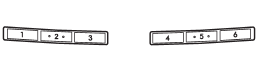
 Preset buttons
How to preset channels
1. Press the “SAT” button to select SAT1, SAT2 and SAT3 reception.
2. Select the desired channel.
3. Press one of the preset buttons for more than 1.5 seconds to store th
Selecting preset channels
Presetting a channel with a preset button allows you to select that channel in
a single operation. Up to six SAT1, SAT2 and SAT3 channels each may be preset.
Display selection in satellite radio
Press the “TEXT” button while receiving the satellite radio to change the display as follows:
SEE MORE:
Basic Diagnostic Procedure of Airbag System
A: PROCEDURE
Check List for Interview
A: CHECK
Identification
A: PROCEDURE
Identify the vehicle using the chassis number, part number of the airbag control module or Subaru Select Monitor.
NOTE: Proper identification is necessary to ensure proper diagnosis. Components are not interchange
Front Ball Joint
A: REMOVAL
1) Lift up the vehicle, and then remove the front wheels.
2) Remove the left and right stabilizer brackets.
3) Remove the ball joint.
Extract the cotter pin (a) from the ball stud.
Remove the castle nut (b).
Extract the ball stud from the front arm.
Remove the bolt securing the bal
© 2010-2026 Copyright www.suoutback.com
