
Subaru Outback (BR): Display selection in CD player
Subaru Outback (BR) 2010-2015 Owners Manual / Audio / CD player operation / Display selection in CD player
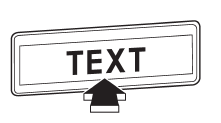
If you press the “TEXT” button during playback, the indication will change to the next one in the following sequence.
For CD-DA:
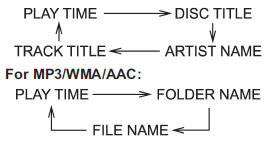
READ NEXT:
 Page (track/folder title) scroll
If you press the “TEXT” button again for at least 0.5 second, the title will
be scrolled so you can see all of it.
NOTE
The display is designed to show titles for up to 30 characters.
Folder selection
Press the “” side of the “FOLDER”
button briefly to select the next folder.
Press the “” side of the button briefly
to go back to the previous folder.
NOTE
● Selecting folde
How to eject a CD from the player (type A)
When a disc is being played back or when a disc is in the player, press the eject
button “”. The disc will be ejected.
NOTE
● Avoid driving the vehicle with a CD sticking out, because
SEE MORE:
Catalytic converter
WARNING
● Avoid fire hazards. Do not drive or park the vehicle anywhere near flammable
materials (e.g. grass, paper, rags or leaves), because the catalytic converter operates
at very high temperatures.
● Keep everyone and flammable materials away from the exhaust pipe while the
e
Rear Axle
A: REMOVAL
1) Lift up the vehicle, and then remove the rear wheels.
2) Remove the axle nut.
CAUTION:
Do not loosen the axle nut while the rear axle is loaded. Doing so may damage
the hub bearing.
Lift the crimped section of axle nut.
Remove the axle nut using a socket wrench while depressing th
© 2010-2026 Copyright www.suoutback.com
