
Subaru Outback (BR): Folder selection
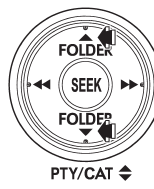
Press the “ ” side of the “FOLDER”
button briefly to select the next folder.
Press the “ ” side of the button briefly
to go back to the previous folder.
NOTE
● Selecting folders in this way is possible only within a single disc.
● Only MP3/WMA/AAC folders are recognized when an attempt to select the next or
previous folder is made. If no appropriate folder exists on the disc, pressing the
“ ” or “
 ”
side of the “FOLDER” button starts playback beginning with the first track/file
(track).
READ NEXT:
 How to eject a CD from the player (type A)
When a disc is being played back or when a disc is in the player, press the eject
button “”. The disc will be ejected.
NOTE
● Avoid driving the vehicle with a CD sticking out, because
How to eject CDs from the player (type B)
NOTE
● Avoid driving the vehicle with a CD sticking out, because vibration might make
it fall out.
● If you do not remove the ejected disc within approximately 15 seconds, a disc
pro
Ejecting a CD from the player
Disc select buttons
1. Use the disc select button to select the disc to be ejected.
2. Briefly press the “” button. The
selected disc will be ejected. The disc number indicator will flash
SEE MORE:
Rear Differential Front Oil
Seal
A: INSPECTION
Make sure that there is no leakage from front oil
seal portion. If there is any leakage, replace the oil
seal and inspect the propeller shaft.
B: REPLACEMENT
1) Shift the select lever or gear shift lever to neutral.
2) Release the parking brake.
3) Disconnect the ground cable from ba
Checking the fluid level
WARNING
Be careful not to burn yourself because the fluid may be hot.
CAUTION
● When power steering fluid is being added, use only clean fluid, and be careful
not to allow any dirt into the tank. And never use different brands together.
● Be careful not to spill power steering fl
© 2010-2026 Copyright www.suoutback.com
