
Subaru Outback (BR): Difference between screen and actual road
Subaru Outback (BR) 2010-2015 Owners Manual / Interior equipment / Rear view camera (if equipped) / Help line / Difference between screen and actual road
The distance markers show the distance for a level road when the vehicle is not loaded. It may be different from the actual distance depending on the loading conditions or road conditions.
When there is an upward slope at the back
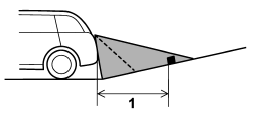
1) 3 feet (1 m)
The distance on the screen looks farther than the actual distance.
When there is a downward slope at the back
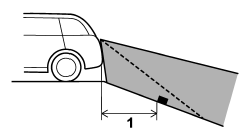
1) 3 feet (1 m)
The distance on the screen looks nearer than the actual distance.
NOTE
When cargo is loaded, the rear view distance on the screen looks farther than the actual distance as in an upward slope.
READ NEXT:
 Feature of distance marker
1) 3 feet (1 m) line
2) 6.5 feet (2 m) line
3) 10 feet (3 m) line
The distance marker shows the distance on the road. If there is a car or other
object close behind, distance cannot be correctl
SEE MORE:
How to use as crossbars
CAUTION
● Do not raise the bar higher than necessary. The base of the bar may be damaged.
● Be careful not to contact the bars while sliding them. Otherwise, the bars may
be scratched or the latch portions may be damaged.
● Do not slide the bar more than necessary when sliding
Vehicle Dynamics Control OFF indicator light in Subaru Outback (BR)
The light will turn on when the ignition switch is set to the "ON" position and will automatically turn off after about 2 seconds. Additionally, the light will illuminate if the Vehicle Dynamics Control OFF switch is pressed to deactivate the Vehicle Dynamics Control system in Subaru Out
© 2010-2026 Copyright www.suoutback.com
