
Subaru Outback (BR): Front turn signal light
Subaru Outback (BR) 2010-2015 Owners Manual / Maintenance and service / Replacing bulbs / Front turn signal light
NOTE
It may be difficult to replace the bulbs. We recommend that you have the bulbs replaced by your SUBARU dealer if necessary.
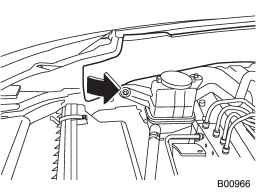
1. Turn over the protective cover of the engine compartment.
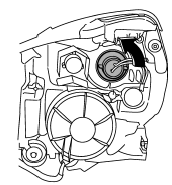
2. Turn the socket counterclockwise and pull it out.
3. Pull out the bulb from the socket and replace the bulb with a new one.
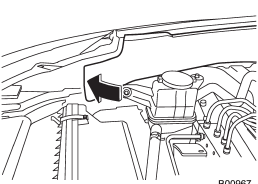
4. After replacing the bulbs, reposition the protective cover of the engine compartment.
READ NEXT:
 Front position light
1. Turn the socket counterclockwise and pull it out.
2. Pull out the bulb from the socket and replace the bulb with a new one.
Front fog light (if equipped)
NOTE
It may be difficult to replace the bulbs. We recommend that you have the bulbs
replaced by your SUBARU dealer if necessary.
1. Pull off the fender lining. Refer to “Pulling off the fender l
Rear combination lights
Legacy
NOTE
It may be difficult to replace the bulbs. We recommend that you have the bulbs
replaced by your SUBARU dealer if necessary.
1. Turn the knobs of the cover 90 degrees counterclockwis
SEE MORE:
Towing
WARNING
Never tow AWD vehicles (including AT, MT and CVT) with the front wheels raised
off the ground while the rear wheels are on the ground, or with the rear wheels
raised off the ground while the front wheels are on the ground. This will cause
the vehicle to spin away due to the operation
Pre-heating or pre-cooling the interior of the vehicle
Models with automatic climate control system:
After the system starts the engine, the automatic climate control system will
activate the “FULL AUTO” mode and heat or cool the interior to the predetermined
median (room) temperature. No presetting of controls is necessary.
Models with manual
© 2010-2026 Copyright www.suoutback.com
