
Subaru Outback (BR): Light control and wiper control levers/switches
Subaru Outback (BR) 2010-2015 Owners Manual / About vehicle / Illustrated index / Light control and wiper control levers/switches
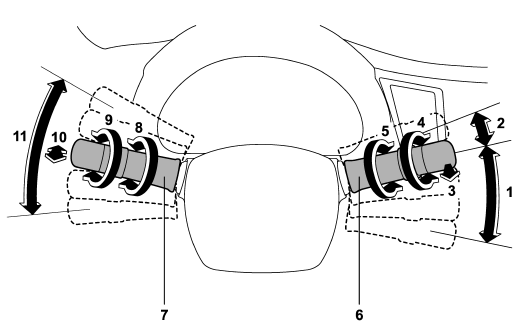
1) Windshield wiper (page 3-31)
2) Mist (page 3-32)
3) Windshield washer (page 3-33)
4) Rear window wiper and washer switch (page 3-34)
5) Wiper intermittent time control switch (page 3-33)
6) Wiper control lever (page 3-32)
7) Light control switch (page 3-27)
8) Front fog light switch (page 3-30)
9) Headlight ON/OFF/AUTO (page 3-28)
10) Headlight flasher High/Low beam change (page 3-28)
11) Turn signal lever (page 3-29)
READ NEXT:
 U.S.-spec. models
1) Trip meter A/B selection and trip meter reset knob (page 3-6)
2) Tachometer (page 3-7)
3) Trip meter and odometer (page 3-6)
4) Speedometer (page 3-6)
5) Multi function display switching knob
Canada-spec. models
1) Trip meter A/B selection and trip meter reset knob (page 3-6)
2) Tachometer (page 3-7)
3) Trip meter and odometer (page 3-6)
4) Speedometer (page 3-6)
5) Multi function display switching knob
SEE MORE:
Maximum load limits
WARNING
Never exceed the maximum load limits explained in the following. Exceeding the
maximum load limits could cause personal injury and/or vehicle damage.
CAUTION
● Adequate size trailer brakes are required when the trailer and its cargo exceed
1,000 lbs (453 kg) total weight.
χ
Power door locking switches
1) Lock
2) Unlock
All doors and the rear gate (Outback) can be locked and unlocked by the power
door locking switches located at the driver’s side and the front passenger’s side
doors. To lock the doors, press the front side of the switch.
To unlock the doors, press the rear side of the
© 2010-2026 Copyright www.suoutback.com
