
Subaru Outback (BR): U.S.-spec. models
Subaru Outback (BR) 2010-2015 Owners Manual / About vehicle / Illustrated index / Combination meter / U.S.-spec. models
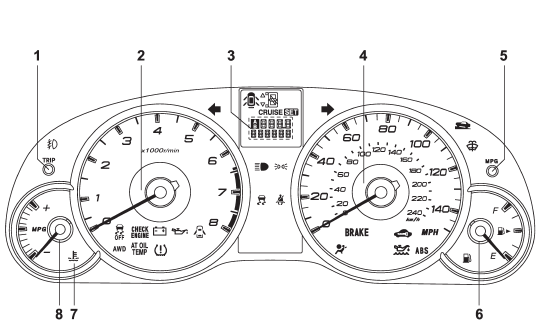
1) Trip meter A/B selection and trip meter reset knob (page 3-6) 2) Tachometer (page 3-7) 3) Trip meter and odometer (page 3-6) 4) Speedometer (page 3-6) 5) Multi function display switching knob (page 3-25) 6) Fuel gauge (page 3-7) 7) Coolant temperature warning/indicator light (page 3-13) 8) ECO gauge (page 3-8)
READ NEXT:
 Canada-spec. models
1) Trip meter A/B selection and trip meter reset knob (page 3-6)
2) Tachometer (page 3-7)
3) Trip meter and odometer (page 3-6)
4) Speedometer (page 3-6)
5) Multi function display switching knob
Function settings
A SUBARU dealer can change the settings of the functions shown in the following
table to meet your personal requirements. Contact the nearest SUBARU dealer for
details.
SEE MORE:
Wiper Blade
A: REMOVAL
1. FRONT
Remove the blade assembly.
1) Lift up the locking clip (A).
2) Turn the blade assembly in the arrow direction.
3) Press the arm in.
4) Pull out the arm while lifting it, and remove the blade assembly from the
arm.
2. REAR
Turn the blade in the direction of arrow (A) and remo
Fast-forwarding
Press the “” side of the “SEEK” button
continuously to fast-forward the track/file. Release the button to stop fast-forwarding.
NOTE
If you fast-forward to the end of the last track/file (track), fast-forwarding
will stop and the player will start playback beginning with the first tr
© 2010-2026 Copyright www.suoutback.com
