
Subaru Outback (BR): OFF button
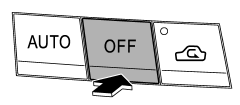
The automatic climate control system turns off (the air conditioner compressor and fan turn off) when the “OFF” button is pressed.
When the “OFF” button is pressed, the outside air circulation mode (air inlet selection OFF) is automatically selected.
READ NEXT:
 Temperature control button
Driver’s side
Passenger’s side
To increase the temperature setting, press the “”
side of the temperature control button. To decrease the temperature setting, press
the “” side of
Defroster button
To defrost or dehumidify the windshield
and front door windows, press the defroster button “”.
When the “” button is pressed, the
air conditioner compressor automatically operates to
Fan speed control button
The fan speed control button has 6 different fan speed positions. The fan speed
is shown by the display.
SEE MORE:
DTC 71, 72, 75, 76, 7A, 7B, 7D, 7E, 91, 92, 95, 96, 9A, 9B, 9D, 9E, A1, A2,
A3, A4, A5, AA, AB, AC, AD, BB
AV:DTC 71 DRIVER'S AIRBAG FAILURE
NOTE:
Be sure to properly identify the Airbag system type prior to performing any
diagnostics.
1. TYPE A
DTC DETECTING CONDITION:
Airbag main harness circuit is open, shorted or shorted to ground.
Airbag module harness (Driver's side) circuit is open, shorted or
Side Airbag Sensor
A: REMOVAL
1) Move the seat all the way forward, from which the airbag sensor is to be
removed.
NOTE:
To remove the seat belt retractor assembly.
2) Turn the ignition switch to OFF.
3) Disconnect the ground cable from battery and wait for at least 60 seconds
before starting work.
4) Release th
© 2010-2026 Copyright www.suoutback.com
