
Subaru Outback (BR): Defroster button
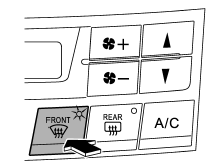
 To defrost or dehumidify the windshield
and front door windows, press the defroster button “”.
When the “” button is pressed, the
air conditioner compressor automatically operates to quickly defog the windshield,
outside air is drawn into the passenger compartment, airflow is directed towards
the windshield and front door windows, and the indicator light on the button illuminates.
After eliminating the fogging from the windshield, return the climate control system to the FULL AUTO mode by pressing the “AUTO” button or turn off by pressing the “OFF” button.
Alternatively, press the “” button
again to return the system to the setting that was selected before you activated
the defroster.
READ NEXT:
 Fan speed control button
The fan speed control button has 6 different fan speed positions. The fan speed
is shown by the display.
A/C – Air conditioner button
If the windshield starts to fog when the climate control system is operated in
the AUTO mode, press the air conditioner button “A/C” to defog and dehumidify. When
this button is pressed, the
Airflow mode selection button
Select the desired airflow mode by pressing the airflow mode selection button.
The selected airflow mode is shown on the display.
There are four airflow modes that activate the following air outl
SEE MORE:
Battery charging, fluid level
Before starting any work near a battery, it's crucial to ensure that all sources of ignition, such as cigarettes, matches, and lighters, are completely extinguished. This precaution is vital because batteries emit a gas that is highly flammable and can lead to explosions if exposed to open flames or
Towing and tie-down hooks/holes
The towing hooks should be used only in an emergency (e.g., to free a stuck vehicle
from mud, sand or snow).
CAUTION
● Use only the specified towing hooks and tie-down hooks/holes. Never use suspension
parts or other parts of the body for towing or tie-down purposes.
● Never use t
© 2010-2026 Copyright www.suoutback.com
