
Subaru Outback (BR): Operating the passengers’ windows
Subaru Outback (BR) 2010-2015 Owners Manual / Keys and doors / Windows / Power window operation by driver / Operating the passengers’ windows
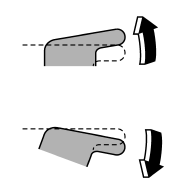
To open:
Press the appropriate switch down and hold it until the window reaches the desired position.
To close:
Pull the switch up and hold it until the window reaches the desired position.
READ NEXT:
 Locking the passengers’ windows
1) Lock
2) Unlock
To lock:
Press the lock switch. When the lock switch is in the lock position, the passengers’
windows cannot be opened or closed.
To unlock:
Press the lock switch again.
Passenger’s side power window switches
Each passenger window can be controlled by the power window switch located on
the door.
SEE MORE:
Woofer
A: REMOVAL
1. SEDAN MODEL
NOTE:
harman/kardon audio system only.
1) Disconnect the ground cable from battery.
2) Remove the rear shelf trim. <Ref. to EI-120, REMOVAL, Rear Shelf Trim.>
3) Remove the woofer.
Remove the screws.
Disconnect the harness connector and remove the woofer assembly
Starting your vehicle
NOTE
All vehicle doors, the engine hood and trunk / rear gate must be closed prior
to activating the remote engine start system. Any open entry point will prevent
starting or cause the system to shut down.
The remote engine start function is activated by pressing the “”
button twice wi
© 2010-2026 Copyright www.suoutback.com
