
Subaru Outback (BR): To remove the cover housing
Subaru Outback (BR) 2010-2015 Owners Manual / Interior equipment / Cargo area cover (if equipped) / To remove the cover housing
1. Rewind the cover.
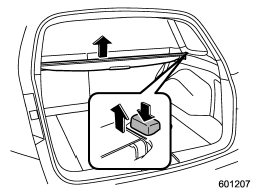
2. Hold down the button on the righthand rear quarter panel and lift up the right-hand cover housing.
3. Remove the cover housing.
READ NEXT:
 Stowage of the cargo area cover
The cargo area cover can be stowed in under the cargo floor.
1. To open the lid, pull the handle up.
2. To keep the lid open, hang the hook (provided on the back of the lid) on the
rear edge o
To install the cover housing
1. To install the cover housing, insert both ends of the cover housing into the
retainers.
2. Make sure to fix the front part of the cargo area cover behind the rear seat.
Convenient tie-down hooks (if equipped)
CAUTION
The convenient tie-down hooks are designed only for securing light cargo. Never
try to secure cargo that exceeds the capacity of the hooks. The maximum load capacity
is 44 lbs (20 kg) per
SEE MORE:
How to use Subaru Select Monitor, data, modes
A: OPERATION
1. HOW TO USE SUBARU SELECT MONITOR
NOTE:
For detailed operation procedures, refer to "PC application help for Subaru Select Monitor".
If communication is not possible between the electronic parking brake control module and the Subaru Select Monitor, check the
Intake Manifold
A: REMOVAL
1. INTAKE MANIFOLD
1) Release the fuel pressure.
2) Disconnect the ground cable from battery.
3) Open the fuel filler lid and remove the fuel filler
cap.
4) Remove the cover (A) and clip (B) from air intake
boot assembly.
5) Loosen the clamp (A) which connects the air intake
boot asse
© 2010-2026 Copyright www.suoutback.com
