
Subaru Outback (BR): Wiper intermittent time control
Subaru Outback (BR) 2010-2015 Owners Manual / Instruments and controls / Wiper and washer / Windshield wiper and washer switches / Wiper intermittent time control
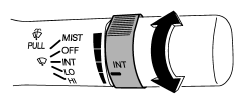
When the wiper switch is in the “INT” position, turn the dial to adjust the operating interval of the wiper. The operating interval can be adjusted in five steps from the shortest interval to the longest.
READ NEXT:
 Windshield washer
To wash the windshield, pull the wiper control lever toward you. The washer fluid
sprays until you release the lever. The wipers operate while you pull the lever.
NOTE
The windshield washer fl
Rear window wiper and washer switch (Outback)
: Washer (accompanied by wiper operation)
ON: Continuous INT: Intermittent OFF: Off
: Washer (accompanied by wiper operation)
Rear wiper
To turn the rear wiper on, turn the knob on the end of the wiper control lever
upward to the “INT” or “ON” position. To turn the wiper off, return the knob on
the end of the lever to the â
SEE MORE:
DTC P0453, P0456, P0457, P0458, P0459, P0461, P04632, P0463, P0464, P0500,
P0506, P0507, P050A, P050B, P0512, P0604, P0607, P0638, P0700, P0851, P0852,
P1152, P1153
CA:DTC P0453 EVAPORATIVE EMISSION CONTROL SYSTEM PRESSURE
SENSOR HIGH INPUT
DTC DETECTING CONDITION:
Immediately at fault recognition
GENERAL DESCRIPTION <Ref. to GD(H4SO)-165, DTC P0453 EVAPORATIVE
EMISSION CONTROL
SYSTEM PRESSURE SENSOR HIGH INPUT, Diagnostic Trouble Code (DTC) Detecting
Dome light switch
1) ON
2) DOOR
3) OFF
The dome light switch has three positions:
ON: The light remains on continuously.
OFF: The light remains off.
DOOR: The dome light illuminates automatically in the following cases.
● Any of the doors or the rear gate (Outback) is opened.
● The doors or the
© 2010-2026 Copyright www.suoutback.com
